If your iPad is not receiving alerts from the Apollo, the issue is typically a loose adapter connection, a network cable problem, or an incorrect IP address configuration. Follow the steps below to diagnose and resolve the issue
Step 1: Check Physical Connections
Before checking any settings, verify that all cables and adapters are properly connected.
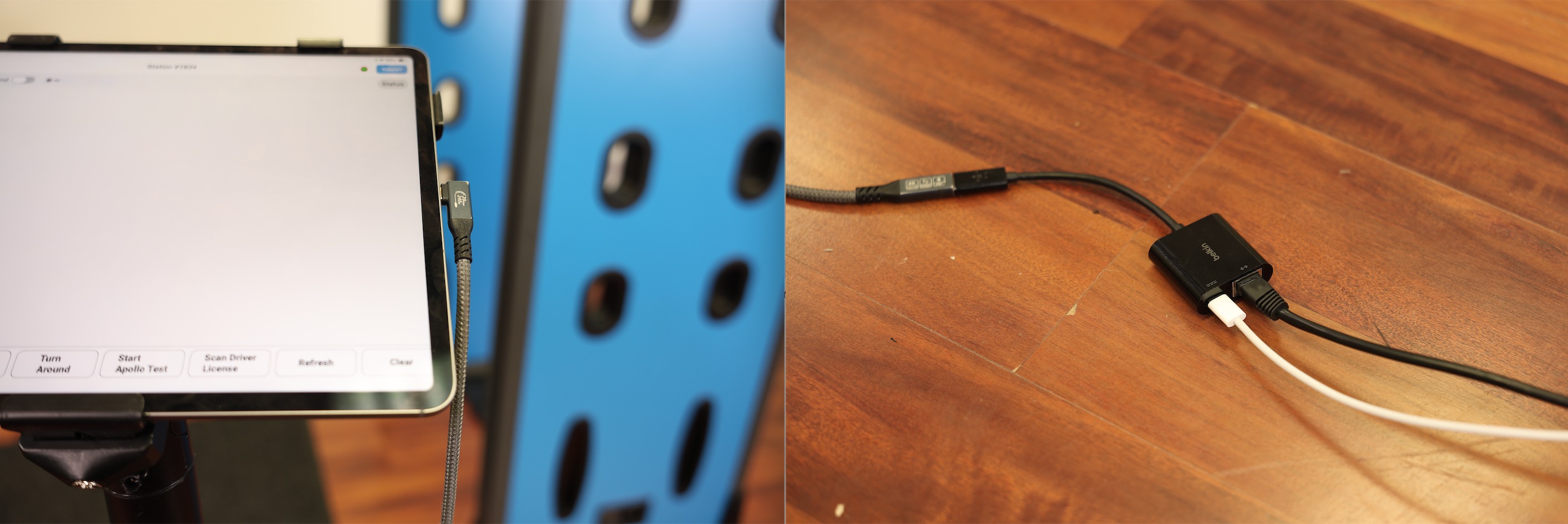
Figure 1 – Physical connection checklist for the iPad adapter.
1.Confirm the adapter (Ethernet dongle) is plugged into the iPad.
The adapter should be seated firmly in the iPad's charging/data port with no wobble.
2.Confirm the network cable is plugged into the adapter.
The cable should click into place securely on the adapter's Ethernet port.
3. Check for indicator lights on the adapter next to the network cable port.
The lights confirm the adapter is receiving a network signal:
- No lights → Contact Athena Security Support.
- Blue Lights are on → Proceed to Step 4.
4. Reboot the iPad.
Hold the power button and slide to power off. Wait 10 seconds, then power it back on. Once restarted, check if alerts are coming through. (iPads are setup with MDM Policy that locks these iPads, If you cannot perform a manual reboot, please reach out to support)
Step 2: Verify IP Address Configuration
If the adapter lights are on and the iPad still isn't receiving alerts after a reboot, the IP addresses in the Apollo app settings may need to be verified. Use the values below as your reference.
iPad LAN IP
In the Apollo app, the iPad's LAN IP should be set to one of the following:
Setting | Value | |
IP Address | 192.168.8.127 or 192.168.68.127 | |
Subnet Mask | 255.255.255.0 |
WDS Apollo Settings
In the Apollo app's WDS settings, verify the following:
Setting | Value | |
IP Address | 192.168.8.201 | |
Remote Port | 7100 |
RTSP Feed Settings
Verify the RTSP feed addresses are configured as follows:
Feed | IP Address | Port |
Entrance | 192.168.8.202 | 554 |
Export | 192.168.8.202 | 8554 |
Thoroughfare | 192.168.8.201 | 554 |
⚠️ Do not use the older RTSP feed addresses. Only the values listed above should be entered.
Still Not Working?
If the iPad is still not receiving alerts after completing all steps above:
- Double-check that all IP values match exactly as listed — even a single digit off will break the connection.
- Try a different Ethernet cable to rule out a faulty cable.
- Ensure the Apollo unit is powered on and running normally.
- Contact Athena Security Support for further assistance.
Need help? Contact supportwe@athenasecurity.com
Was this article helpful?
That’s Great!
Thank you for your feedback
Sorry! We couldn't be helpful
Thank you for your feedback
Feedback sent
We appreciate your effort and will try to fix the article