There are two methods to reboot your Apollo 500 unit: a soft reboot using the power button and a hard reboot by disconnecting power. Both methods are safe and effective for resolving common issues.
Option 1 1: Soft Reboot (Power Button)
This is the quickest way to restart your Apollo 500 system.
Steps
1. Locate the side panel of your Apollo 500 unit
2. Find the power button in the bottom right corner of the screen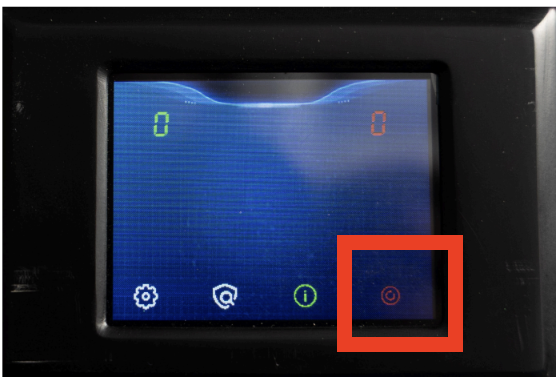
3. Press and hold the power button until the unit begins to shut down
4. Listen for a beeping sound - this indicates the system has successfully restarted and is ready to operate
When to use: This method is ideal for quick restarts and is the first troubleshooting step for most issues.
Watch This Video :https://drive.google.com/file/d/12xeiVuPxkWbpVjQmV4SoZD-A7Ybk4Hqz/view?usp=drive_link
Option 2: Hard Reboot (Power Cycle)
This method fully cuts power to the system and can resolve more persistent issues.
Steps:
1. Go to the base or side panel of the Apollo 500 unit
2. Locate where the main power or PoE Cat6 cable connects to the unit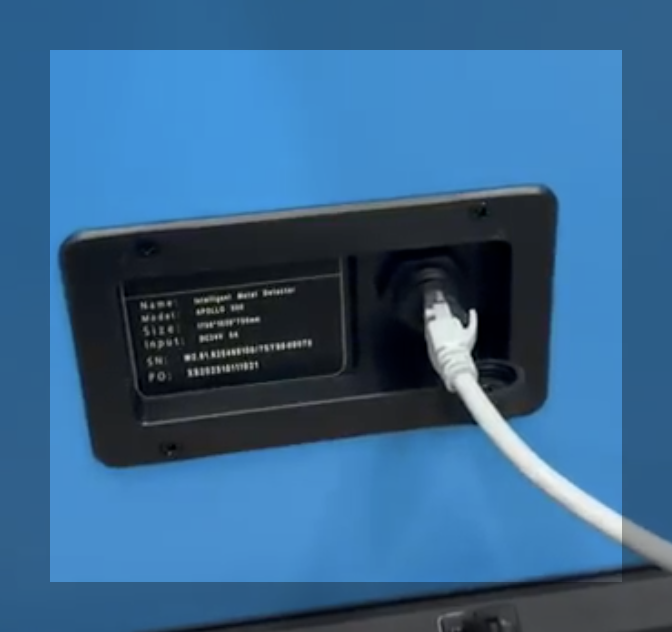
3. Unplug the power cable from the unit
4. Wait 5 minutes - this allows the system to fully discharge and reset
5. Plug the cable back in securely
6. The unit will automatically power on and begin its startup sequence
7. Listen for the beeping sound to confirm successful restart
When to use: Use this method when the soft reboot doesn't resolve the issue, or when the system is completely unresponsive.
Watch This Video :https://drive.google.com/file/d/1ge6bWDxcCOFQo__QUXJfLTqxPMCatUtP/view?usp=drive_link
Troubleshooting Tips
System won't power on: Verify the PoE Cat6 cable is securely connected at both ends and check your network switch or PoE injector.
Issues persist after reboot:Contact Athena Security Support for additional assistance.
---
Email- support@athena-security.com,
Call-833-928-4362 27/7 Support
Athena Security Help Desk Ticket (website)
https://support.athena-security.com/support/home
Was this article helpful?
That’s Great!
Thank you for your feedback
Sorry! We couldn't be helpful
Thank you for your feedback
Feedback sent
We appreciate your effort and will try to fix the article